5 Printer All in One Yang Bagus Untuk Perkantoran
Kelebihan all in one dengan berbagai fungsi lainnya akan memudahkan anda dalam penghematan biaya, tenaga, dan waktu yang menjadi poin terpenting. Karena beberapa permasalahan pada printer yang kita ketahui selama ini yaitu jika anda menggunakan dalam waktu yang lama untuk print hasil yang banyak akan membuat printer tersebut menjadi panas dan tidak lagi bisa beroperasi. Sehingga anda harus menunggu dalam waktu beberapa jam untuk bisa menggunakannya kembali.
Pengguna printer pribadi biasanya sangat dibutuhkan oleh mahasiswa tingkat akhir yang akan sangat sering atau bahkan setiap hari menggunakan printer untuk print hasil skripsi dan keperluan untuk melengkapi tugas lainnya. Jika anda memiliki anggota keluarga lebih dari dua orang yang dapat menggunakan printer maka tidak ada salahnya anda membeli untuk keperluan ini.
Ditambah jika orang tua anda memiliki profesi sebagai pegawai kantoran yang pasti akan sering menggunakan printer. Memiliki printer pribadi akan sangat membantu anda dalam penghematan biaya dan tenaga, jika biasanya anda harus jauh-jauh dan capek pergi ke warung internet hanya untuk print selembar dokumen akan sangat menghabiskan waktu dan tenaga. Kini dengan memilikinya sendiri dirumah semuanya dapat terselesaikan secara cepat.
Apa Itu Printer All in One?
Kini printer tidak hanya memiliki fungsi sebagai pencetak dokumen saja melainkan juga mampu untuk memudahkan anda dalam menyelesaikan segala keperluan kantor seperti fotokopi, fax, bahkan scanner. Kemudahan ini hanya bisa anda dapatkan dari jenis printer all in one yang sengaja dibuat untuk menjawab segala kemudahan kerja anda juga menjadi cara untuk menghemat biaya yang akan dikeluarkan. Namun apakah anda tahu apa itu printer all in one?
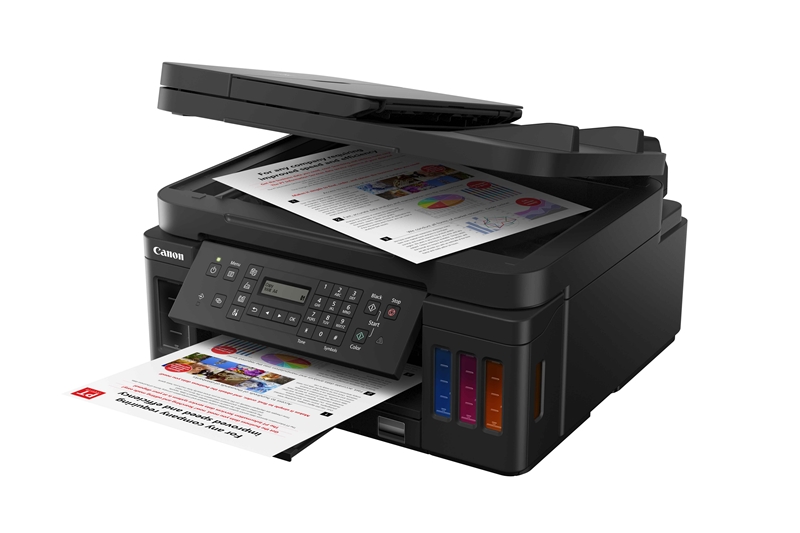
Printer all in one dengan makna yang dimiliki yaitu multifungsi merupakan printer yang mampu melakukan pekerjaan lebih dari satu atau beragam jenis untuk memudahkan para pengguna untuk menjawab berbagai macam kebutuhan saat ini. Proses pengiriman faks dan scanner yang biasanya hanya bisa dilakukan oleh mesinnya sendiri kini bisa anda dapatkan di printer all in one yang biasanya karyawan kantoran dan pebisnis kecil-kecilan di warung internet yang memilih salah satu dari 5 printer all in one yang bagus untuk perkantoran harga terbaik.
Printer All in One Yang Bagus Untuk Perkantoran
Beberapa daftar merek printer all in one yang bagus untuk perkantoran harga terbaik berikut dapat menjadi referensi bacaan anda untuk memilih jenis printer yang sedang anda cari.
1. Printer HP OfficeJet Pro 8720

Dikenal sebagai printer all in one yang bagus untuk perkantoran harga terbaik, seri printer merek HP ini ternyata menawarkan harga termurah yang sudah lengkap dengan fitur WiFi dan Anda bisa mencetak dokumen langsung dari Laptop, Smartphone, atau Tablet melalui WiFi, dengan atau tanpa bantuan Router. Serta dapat mencetak 400 lembar dokumen hitam dan putih serta 300 lembar untuk hasil warna.
Spesifikasi Printer HP OfficeJet Pro 8720
Functions Print, copy, scan, fax
Multitasking supported Yes
Print speed black
ISO: Up to 24 ppm
Draft: Up to 37 ppm
Print speed color ISO:Up to 20 ppm
Draft:Up to 37 ppm
First page out (ready)
Black: As fast as 9 sec
Color: As fast as 10 sec
Duty cycle (monthly, A4) Up to 30,000 pages
Recommended monthly page volume 250 to 2,000
Print technology HP Thermal Inkjet
Print quality (best)
Color: Up to 4800 x 1200 optimised dpi on HP Advance Photo Paper 1200 x 1200 dpi input
Black: 1200 x 1200 rendered dpi
Display 10.92 cm (4.3″) Colour Graphic Display touchscreen
Processor speed 600 Mhz
Number of print cartridges 4 (1 each black, cyan, magenta, yellow)
Automatic paper sensor Yes
HP ePrint capability Yes
Wireless capability Yes, built-in Wi-Fi 802.11b/g/n
Connectivity, standard
1 USB 2.0
1 Host USB
1 Ethernet
1 Wireless 802.11b/g/n
2 RJ-11 modem ports.
2. Printer Fuji Xerox Docuprint CM225fw

Jenis printer all in one yang bagus untuk perkantoran harga terbaik ini sudah dilengkapi dengan Google Cloud Print dengan kemampuan menghasilkan cetakan hingga 800 lembar untuk dokumen warna pada ukuran kertas A4.
Spesifikasi Printer Fuji Xerox Docuprint CM225fw
| Print Speed | 18 ppm color and monochrome |
| First Page Out | 15.0 seconds colour, 12.5 seconds monochrome |
| Memory Standard/Maximum | 256MB |
| Print Language or PDL (Page Description Language) | PCL5e, PCL6, PostScript 3 Compatible |
| Duty Cycle | 30,000 pages |
| Print Resolution (dpi) | 1200 x 2400 dpi (Fuji Xerox Imaging Technology) |
| Image Processing | 525MHz |
| Media Size | A4, B5, A5, Letter, Executive, Folio, Legal, Envelope, Custom Size width 76.2 to 215.9 mm Length 127 to 355.6 mm |
| Paper Input Capability | 150 sheets |
| Paper Output Capability | 100 sheets |
| Connectivity | 10/100BaseT, USB 2.0, Wireless, Wi-FI Direct |
|
Printer Features
|
AirPrint, Toner Save Mode, Manual Duplex, Print Cancel, N-up, Poster, Watermarks, Collate, Image Rotation, USB Direct Print, Secure Print. |
3. Printer All in One EPSON WF-7611

Bagi anda yang ingin mendapatkan hasil scan yang lebih jelas bisa anda dapatkan dari jenis printer all in one yang bagus untuk perkantoran harga terbaik ini yang mampu print, foto copy, dan bahkan scan dalam jumlah ratusan lembar lebih per hari. Harga yang ditawarkan juga tergolong ekonomis.
Dengan printer all in one yang bagus untuk perkantoran harga terbaik ini anda bisa menikmati percetakan dengan kecepatan etak default hingga 18ipm untuk hitam dan 10ipm untuk warna, dan kecepatan rancangan cetak hingga 32ppm untuk hitam dan 20ppm untuk warna.
Spesifikasi Printer All in One EPSON WF-7611
Printer Type Print, Scan, Copy, Fax with ADF
Print
Print Method: PrecisionCore Printhead
Nozzle Configuration: 400 x 2 nozzles Black, 128 x2 nozzles per colour
Print Direction: Bi-directional printing, Uni-directional printing
Maximum Resolution: 4800 x 2400dpi (with Variable-Sized Droplet Technology)
Minimum Ink Droplet Volume: 2.8 pl
Print Speed*1:
Draft Text – Memo, A4 (Black#1/Color#2) Approx. 32 ppm/20 ppm
ISO 24734, A4 (Black/Color) Simplex: Up to 18ipm / 10ipm
Duplex: 8.7ipm / 6.0ipm
ISO 24734.2, A3 (Black/Color) Simplex: Up to 10ipm / 5.0ipm
Duplex: 6.0ipm / 3.7ipm
Photo Default – 10x15cm/4×6”*2#3 Approx. 42 sec per photo (Border) /
52 sec per photo (Borderless)
Maximum Monthly Duty Cycle: 20,000 pages / month
*1. Print speed (Pages Per Minute) is calculated when printed on A4 plain paper in the fastest mode, 10 x 15 cm photo print speed when printed on Epson Premium Glossy Photo Paper. Print speed may vary depending on system configuration, print mode, document complexity, software, type of paper used and connectivity. Print speed does not include processing time on host computer.
*2. When printed on Epson Premium Glossy Photo Paper.
Copy
Copy Speed: ISO 29183, A4 (Black/Color): Simplex: Up to 16 ipm / 8.8 ipm
Copy Quality: Normal / Best quality
Maximum Copies From Standalone: 999 copies
Reduction / Enlargement: 25 – 400%, Auto Fit Function
Maximum Copy Resolution: 600 x 600dpi
Maximum Copy Size: A3
Scan
Scanner Type: Flatbed colour image scanner
Sensor Type: CIS
Optical Resolution: 1200 dpi x 2400 dpi
Maximum Scan Area: 297.18 x 431.8 mm (11.7 x 17″)
Scanner Bit Depth
Color: 48-Bit input, 24-bit output
Greyscale: 16-Bit input, 8-bit output
Black & White: 16-Bit input, 1-bit output
Scan Speed (Flatbed / ADF):
(200 dpi) Monochrome: 6.0 sec / 8.3 ppm
(200 dpi) Color: 12 sec / 4.8 ppm
Fax
Type Of Fax: Walk-up black-and-white and color fax capability
Receive Memory / Page Memory:
6MB, Page memory
Up to 550 pages (ITU-T No.1 chart)
Error Correction Mode: ITU Group3 fax with Error Correction Mode
FAX speed (data transfer rate): Up to 33.6kbps, Approx. 3sec/page
FAX resolution: Up to 200 x 200dpi
Transmission Paper Size
Flatbed: A5, Half Letter, B5(JIS), Letter, A4, Legal, B4(JIS), A3, 11 x 17″
ADF: A5, B5(JIS), Letter, A4, Legal, B4(JIS), A3, 11 x 17”
Receiving Paper Size: A5, Half Letter, B5(JIS), Letter, A4, Legal, B4(JIS), A3, 11 x 17″
Speed Dial / Group Dial: Up to 200 numbers, 199 groups
Fax Features:
PC Fax (Transmission/Receive),
Automatic redial, Address book, Delay Send,
Broadcast Fax (Mono Only)
ADF Function Support Paper Thickness: 64-95g/m2
Paper Capacity: 35 pages (75g/m2)
Card Slot / USB Host Function
USB Host: USB Host (Scan to memory device / Storage function)
Type of Direct Printing: Card Slots / USB Memory
Supported Memory Cards: SD Card, Memory Stick
Paper Handling
Paper Feed Method: Friction feed
Number of Paper Trays: 2 (Front 1, Rear 1)
Paper Hold Capacity Input Capacity:
Cassette: 250 sheets, A4 Plain paper (80g/m2), 20 sheets, Premium Glossy Photo Paper
Rear Slot: 1 sheet
Output Capacity:
125 sheets, A4 Plain Paper
20 sheets, Premium Glossy Photo Paper
Paper Size:
A3+, A3, A4, A5, A6, B4, B5, Tabloid, Legal, Letter, Half Letter, 5×7″, 4×6″, 3.5×5″,
Envelopes: #10, DL, C6, C4
Maximum Paper Size: 329 x 1200mm (12.95 x 47.24″)
Print Margin: 0 mm top, left, right, bottom via custom settings in printer driver*3
*3. Via custom setting. Otherwise, 3mm top, left, right, bottom.
Interface USB: High-Speed USB 2.0
Network: Ethernet, Wi-Fi IEEE 802.11b/g/n, Wi-Fi Direct
Network Protocol: TCP/IPv4, TCP/IPv6, LPD, IPP, PORT9100, WSD
Network Management Protocols:
SNMP, HTTP, DHCP, BOOTP, APIPA, PING, DDNS, mDNS, SNTP, SLP, WSD, LLTD
Security Functions:
Limit Access Function, PIN Release, LDAP Address Book, Panel Admin Mode
Mobile and Cloud Printing Epson Connect: Epson iPrint, Epson Email Print, Remote Print Driver, Scan to Cloud
Other Mobile Solutions: Apple AirPrint, Google Cloud Print
Control Panel LCD Screen: 4.3” TFT Colour LCD
Printer Software Operating System Compatibility:
Windows XP/ XP Profesional x 64 Edition/ Vista/ 7/ 8/ 8.1
Mac OS X 10.5.8, 10.6.x, 10.7.x, 10.8.x, 10.9x
Electrical Spec Rated Voltage: AC 100-240V
Rated Frequency: 50~60 Hz
Power Consumption Operating: 18W
Standby: 8.5W
Sleep: 1.7W
Power Off: 0.3W
Noise Level PC Printing / Premium Glossy Photo Paper Best Photo: 5.5 B(A), 40 dB(A)
PC Printing / Plain Paper Default*4: 6.2 B(A), 47 dB(A)
*4. Default mode in accordance with ISO7779 for MFPs.
Dimension 567mm x 486mm x 340mm
Weight 18.5 kg
4. Printer Brother MFC-9140CDN

The MFC-9140CDN adalah printer all in one yang bagus untuk perkantoran harga terbaik dengan kecepatan tinggi Multi-Function Centre ® yang menggabungkan fitur yang kaya dalam desain yang ramping dan kompak. Dengan kecepatan cetak hingga 22ppm, konektivitas jaringan dan 2-Sided mencetak MFC-9140CDN melakukan itu semua dengan mudah.
Spesifikasi Printer Brother MFC-9140CDN
|
Print Technology
|
Electrophotographic LED (Single Pass)
|
|
Print Resolution (maximum dpi)
|
Up to 600 x 600 dpi, 2400 x 600 dpi
|
|
Duplex (Double-sided) Print
|
Manual Duplex, 7/7sides per minute, Automatic Double-sided print up to 7 sides per minute, Up to 22ppm (A4)
|
| FAX | |
|
Modem Speed
|
33.6 Kbps Super G3
|
|
Transmission Speed
|
Approx. 2 sec. (ITU-T Test Chart #1, Std resolution, JBIG)
|
|
Speed Dials
|
200 locations
|
|
Auto Reduction
|
Automatically reduces a received fax to fit onto a single sheet of A4
|
| COPY | |
|
Copy Resolution
|
600 x 600 dpi
|
|
Copy Speed
|
Up to 22/ 23ppm ( A4/letter)
|
| SCAN | |
|
Scanning Capability
|
Colour & Monochrome, Monochrome
|
|
Optical Scanning Resolution
|
Max 1200 x 2400 dpi
|
|
Interpolated Scanning Resolution
|
Max. 19,200 x 19,200 dpi
|
| Network |
ARP, RARP, BOOTP, DHCP, APIPA(Auto IP), WINS/NetBIOS name resolution, DNS Resolver, mDNS, LLMNR responder, LPR/LPD, Custom Raw Port/Port9100, POP3, SMTP Client, IPP/IPPS, FTP Client and Server, CIFS Client, TELNET Server, SNMPv1/v2c/v3, HTTP/HTTPS server, TFTP client and server, ICMP, Web Services (Print/Scan), SNTP Client
|
|
Compatible Media Sizes
|
|
|
Power Consumption
|
Ready: 70W, Printing: 375W, Power save: 1.8W
|
| Dimensi |
410 x 483 x 410 mm
|
| Berat | 23.6 kg |
5. Printer Canon [MF8210Cn]

Printer all in one yang bagus untuk perkantoran harga terbaik multi guna dengan kemampuan pencetakan mobile. Solusi mudah untuk bisnis modern. FPOT (A4): 18 detik, Kecepatan cetak (A4): hingga 14 pp, Cetak, scan, salin, LAN berkabel. Volume cetak bulanan yang direkomendasikan: 250 – 1,000 halaman.
Spesifikasi Printer Canon [MF8210Cn]
| Platform | Multifunction |
| Tipe Printer | Color Laser |
| Resolusi |
Warna : Sampai dengan 600 x 600 dpi ( 2400 x 600 dpi kualitas )
|
| Kecepatan Cetak |
1200 x 1200dpi (equivalent)
2400 (equivalent) x 600dpi
|
| Ukuran Kertas | A4, Letter |
| Konektivitas |
|
| Memori | 256MB (Shared ) |
| Media | Plain, Heavy, Recycled, Colour, Coated, Transparency, Label, Index, Envelope |
| Compatible Media Sizes | Poster, Watermark, Page Composer, Toner Saver |
| Copy Function |
|
| Scanner Function |
|
| Power Consumption | 900W or less max |
| Sistem Operasi | Windows 8 (32 / 64-bit), Windows 7 (32 / 64-bit), Windows Server 2012 (32 / 64-bit), Windows Server 2008 R2 (32 / 64-bit), Windows Server 2008 (32 / 64-bit), Windows Vista (32 / 64-bit), Windows Server 2003 (32 / 64-bit), Windows XP (32 / 64-bit), Mac OS X 10.5.8 & up, Linux |
| Dimensi (W x D x H) | 430 x 484 x 375mm |
| Berat | 24.0kg (with cartridge) |
Dari 5 printer all in one yang bagus untuk perkantoran diatas, mana yang menjadi pilihan Anda?